

 Website load time was one of the most important factor affecting the usability, the most Internet users would only skip a site entirely if it fails to load in a few seconds. Below you will find a simple yet effective to ensure that your website run faster.
Showing posts with label Web Article. Show all posts
Showing posts with label Web Article. Show all posts
6 Tips to Speed Up Your Website
Website load time was one of the most important factor affecting the usability, the most Internet users would only skip a site entirely if it fails to load in a few seconds. Below you will find a simple yet effective to ensure that your website run faster.
Firebug and CSS Layout
When your CSS boxes aren't lining up correctly it can be difficult to understand why. Let Firebug be your eyes and it will measure and illustrate all the offsets, margins, padding, and sizes for you.
 With CSS, every element is made up of nested boxes known as the margin, border, padding, and content. As you move your mouse over an HTML element in any of Firebug's tabs, you'll see the element's boxes shaded in different colors right inside the page. There's no quicker way to visualize the difference between margins and padding, for example.
 Firebug's Layout tab gives you a visual breakdown of each box in the box model and the width of each each edge. Additionally, it shows you the width and height of the innermost box, and the x and y offset of the element relative to its parent.
 Don't be shy, move your mouse around the boxes in the Layout tab. As you do, rulers and guides will appear in the page.
The rulers surround the current element's offset parent, which is the element that its left, top, bottom, and right CSS properties are relative to. The guides are tangent to each edge of the element and are a great way to show pixel-perfectionists just how close they are to making the edges of multiple boxes align.
 Just like every other tab in Firebug, the Layout tab can be edited. Click on any number in the view and a little editor will appear. Just like in the CSS editor, you can use the up and down arrow keys to change the number by one, or the page up and down keys to change it by ten.
Quote from : FIREBUG
Box model shading
With CSS, every element is made up of nested boxes known as the margin, border, padding, and content. As you move your mouse over an HTML element in any of Firebug's tabs, you'll see the element's boxes shaded in different colors right inside the page. There's no quicker way to visualize the difference between margins and padding, for example.Measure each edge
Firebug's Layout tab gives you a visual breakdown of each box in the box model and the width of each each edge. Additionally, it shows you the width and height of the innermost box, and the x and y offset of the element relative to its parent.Rulers and guides
Don't be shy, move your mouse around the boxes in the Layout tab. As you do, rulers and guides will appear in the page.The rulers surround the current element's offset parent, which is the element that its left, top, bottom, and right CSS properties are relative to. The guides are tangent to each edge of the element and are a great way to show pixel-perfectionists just how close they are to making the edges of multiple boxes align.
Move it, will ya?
Just like every other tab in Firebug, the Layout tab can be edited. Click on any number in the view and a little editor will appear. Just like in the CSS editor, you can use the up and down arrow keys to change the number by one, or the page up and down keys to change it by ten.Quote from : FIREBUG
Firebug : CSS Development
Firebug's CSS tabs tell you everything you need to know about the styles in your web pages, and if you don't like what it's telling you, you can make changes and see them take effect instantly.
Firebug : HTML Development

Firebug makes it simple to find HTML elements buried deep in the page. Once you've found what you're looking for, Firebug gives you a wealth of information, and lets you edit the HTML live.
View source live
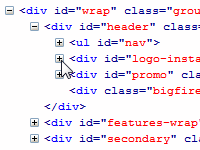 Firefox has a "View Source" window, but it doesn't show you what the HTML source really looks like once it has been transformed by JavaScript. Firebug's HTML tab shows you what the HTML looks like right now.
In addition, the tabs on the right side let you discover the properties of an individual element, including the CSS rules that are styling it, the pixels that define its position and size, and the DOM properties that you can access from JavaScript.
Subscribe to:
Comments (Atom)